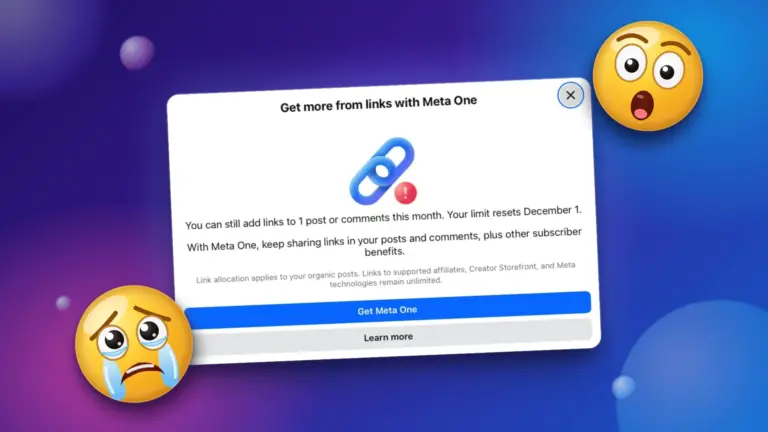
After years of algorithmically suppressing external links on Facebook and Instagram, Meta now informs us a mere 1.3% of posts contain an external link. So now would seem like the time to start charging authors, creators, and small business for links, right? RIGHT?!
In 2022, links made up about 9.8% of view. In 2026, that’s down to 1.3%. These days, Meta wants you to create video content measured in watch time. More video sells advertising. So promoting your products or services using organic links off of Meta platforms has been penalized.
This is why many marketing professionals make shared a wakeup call… “don’t build on borrowed land”. The landlord sets the rules. The “rules”, the algorithm, can change at any time, putting your marketing reach at risk.
Now we have the second wakeup call.
In September of 2026, Meta announced the Meta One subscription. As per Meta… “What it offers: Enhanced AI tools, creative and expression features, profile upgrades, automated follow invitations for content engagement, increased access to the Meta Business Agent, clickable links in organic posts and Reels, and verified badges”.
Ah, there’s the catch. Meta One adds a number of creative tools and enhanced AI, all designed to “increase content engagement”. But the content that they want engagement with is meant to be on Facebook or Instagram, not your own website. Without a subscription, external links are extremely limited. And by extremely limited, I mean two external links a month.
Meta One Pricing and Link Quotas
Business & Professional Tiers
These tiers are priced per account or profile per month. Monthy quotas cover external or “outbound” links in posts and comments. Yes, the “link in first comment” placement loophole has been closed.
- No subscription / free tier
- Price: Free
- Facebook Quota: 2 organic posts or comments with link
- Instagram Quota: 0 link posts or reels
- Essential tier
- Price: $14.99 / month
- Facebook Quota: 2 organic posts or comments with link (does not increase free allowance)
- Instagram Quota: 0 link posts or reels
- Advanced tier
- Price: $49.99 / month
- Facebook Quota: 2 organic posts or comments with link (does not increase free allowance)
- Instagram Quota: 0 link posts or reels
- Essential tier
- Price: $14.99 / month
- Facebook Quota: 2 organic posts or comments with link (does not increase free allowance)
- Instagram Quota: 0 link posts or reels
- No Subscription / Free Tier
- Price: Free
- Facebook Quota: 2 organic posts or comments with links per month
- Instagram Quota: 0 link posts or reels (clickable links are unavailable)
- Essential
- Price: $14.99 / month
- Facebook Quota: 2 organic posts or comments with links per month (does not increase the free Facebook limit)
- Instagram Quota: 0 link posts or reels (no published post/reel link allowance)
- Advanced
- Price: $49.99 / month
- Facebook Quota: 8 link posts or comments per month (and up to 8 Facebook Reels with links)
- Instagram Quota: Up to 4 posts and 4 reels with clickable links per month
- Expert
- Price: $149.99 / month
- Facebook Quota: 20 link posts or comments per month (and up to 20 Facebook Reels with links)
- Instagram Quota: Up to 8 posts and 8 reels with clickable links per month
- Max
- Price: $499.99 / month
- Facebook Quota: Unlimited / uncapped link posts and reels
- Instagram Quota: Up to 12 posts and 12 reels with clickable links per month
Consumer & AI Bundles
These tiers focus on UI customization, cross-app enhancements, and generative AI compute; they do not include business link-posting allocations.
- Facebook Plus / Instagram Plus: $3.99 / month each
- WhatsApp Plus: $2.99 / month
- Core Bundle (Combines Facebook, Instagram, and WhatsApp Plus + baseline AI generation): $7.99 / month
- Premium Bundle (Core Plus features + expanded monthly AI image/video generation limits): $19.99 / month
Key Quota Mechanics & Exemptions
- What Counts: Quotas meter organic posts and comments containing external outbound URLs. Multiple URLs within a single post or comment count as one spent allocation.
- No Carryover: Unused monthly links do not roll over to the following billing cycle. Quotas reset on the 1st of the month for free accounts and on the renewal billing date for paid subscribers.
- Exempt Destinations: Links pointing to destinations inside the Meta ecosystem (Threads, Instagram, WhatsApp, Facebook Pages, or Events) do not count against monthly caps.
- Ad Exemption: Links placed within paid ads or boosted content remain 100% exempt and uncapped across all tiers.
What This Really Means
- The “Link in comments” workaround is dead: The “link in comments” loophole helped get around the link suppression algorithm. Now that link comes from your monthly allowance.
- No carry-over: use ’em or lose ’em. Unused credits expire at the end of the month or billing period.
- Subscribing buys permission: A subscription grants you permission to post content or reels with links. It doesn’t boost or guarantee reach. Your link is still subject to the algorithm.
- What is exempt: Links to anything inside the Meta walled garden does not count toward your allowance. Paid ad and boosted content are also exempt.
Why This Is Bad For Small Businesses and Creators
If you share a blog post, or a link to your booking calendar, or to a product on your Shopify site, your ability to share these links regularly on Facebook and Instagram is very limited now. You are not going to achieve organic growth posting twice a month.
The Meta One subscription gives the illusion of choice. It’s another way to monetize external links. Your choices are paying a Meta subscription to share a handful of links a month, or reallocating that money to Meta Ads for specific posts.
For small businesses and service providers that most two or three times a week will find that this is no longer the playbook. If your business publishes blog posts or product updates 15 times a month, you’re pushed into the $149 Expert tier just to keep doing that.
Paying that kind of money for 20 links a month on a platform that already suppresses these links is not good for return on investment. Not paying a for links will see referral traffic from Meta to your website dry up.
How To Pivot And Avoid The Link Caps
If you rely on Facebook and Instagram directing an audience to your website, you can make a few adjustments to bypass these link caps and avoid a subscription.
- Use “Comment-to-DM” automation: Meta’s limits apply to Page posts and public comments, not Direct Messages. Use native Meta post automations (or tools like ManyChat) with calls-to-action such as: “Drop the word WORKSHOP below and we’ll send the registration link straight to your DMs.” This drives comment engagement while delivering the link privately.
- Adopt “Zero-Click” content: Stop treating social media posts as teasers for an off-site article. Publish the key takeaways, data, or tutorial directly inside a text post, carousel, or short Reel. Build authority on the platform, and reserve your link-sharing for high-intent actions.
- Treat your free links like premium inventory: With only 2 free links a month, do not waste them on low-converting blog posts. Reserve them exclusively for your highest-converting lead magnet, major product drop, or major promotion.
- Route traffic to Meta-native endpoints: Direct traffic to a WhatsApp Business chat, a Facebook Group, or an on-platform event page, all of which do not consume link credits.
- Point your profile website link at a link sharing page: Use a service like LinkTree or use a plugin like my Dynamic Link Hub plugin for WordPress for a self-hosted link sharing page. For an example, check out my link sharing page.
- Prioritize an owned email/SMS list: The clearest lesson from this rollout is that borrowed audiences on social media carry risk. The most reliable defense is accelerating efforts to convert followers into direct email subscribers.
With a few changes in approach, you can still promote content and services within the free Meta One tier.
If you haven’t seen a Meta One link quota on your small business page, don’t worry, It’s coming for your business page too. I hope you picked up a few workarounds from this post!